
Upcoming Changes
Verified Duo Push for Multi-Factor Authentication
To improve UF’s security posture and help protect against phishing attacks, UFIT is enabling Verified Duo Push starting this Fall as part of UF’s Duo multi-factor authentication platform.
Verified Duo Push will be enabled for university affiliations in phases:
- Tuesday, Nov. 18: All IT staff - Completed
- Tuesday, Jan. 27: All UF staff - Completed
- Tuesday, Feb. 10: All UF faculty - Completed
- Tuesday, Feb. 24: All UF students -Completed
- Tuesday, March. 10: Remaining community members -Completed
What’s Changing
For those currently enrolled in Duo Push, you are prompted with “approve” or “deny” options on the Duo Mobile app when logging into a university website with Shibboleth single sign-on, such as ONE.UF.
With Verified Duo Push, you’ll instead see a 3-digit code on your login screen and will be prompted to enter that code into the Duo Mobile app to verify your login.
This quick step ensures that only you — the person actually logging in — can approve the request.
This upgrade replaces the existing Duo Push on mobile devices. If you are currently using other MFA offerings to complete your authentication onto university websites, this transition will not affect you. This change impacts only web logins through login.ufl.edu. Services where Verified Duo Push is currently not feasible, such as UF’s VPN, will continue to leverage Duo Push.
Why We’re Making This Change
Attackers have started using “MFA bombing” and other forms of social engineering to trick users into approving fraudulent Duo notifications. Verified Duo Push protects against these attacks by requiring you to confirm the exact code shown on your screen, proving that you’re present for the login.
What You Need to Do
- Make sure you have the latest version of Duo Mobile installed on your device.
- When prompted, simply type the 3-digit code displayed on your login screen into the Duo app.
- No enrollment changes are needed — your current Duo setup will continue working.
USER INTERFACE
There is a new look and feel of the prompt screen (shown).
| Browser | Duo Mobile App |
|---|---|
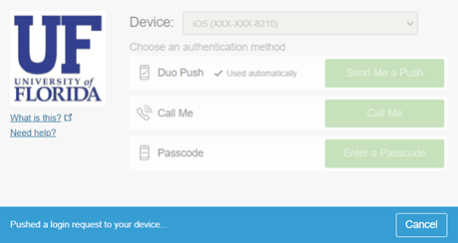 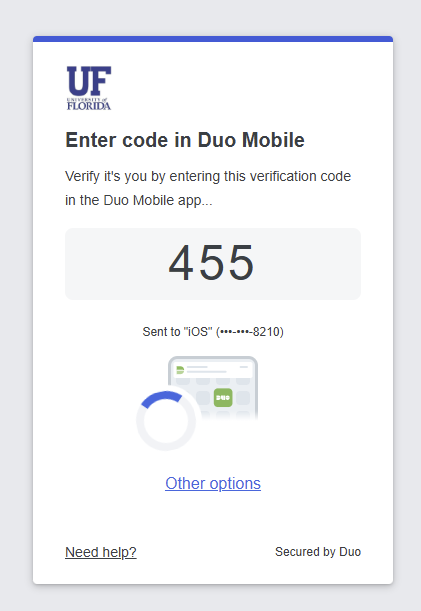 |
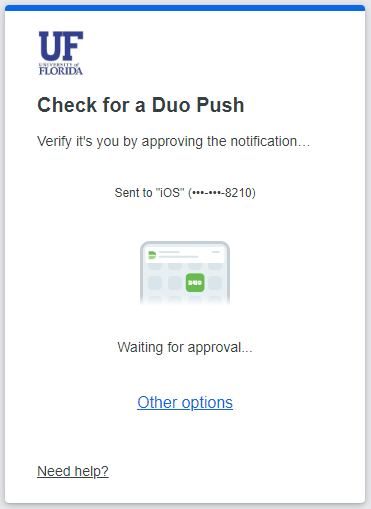 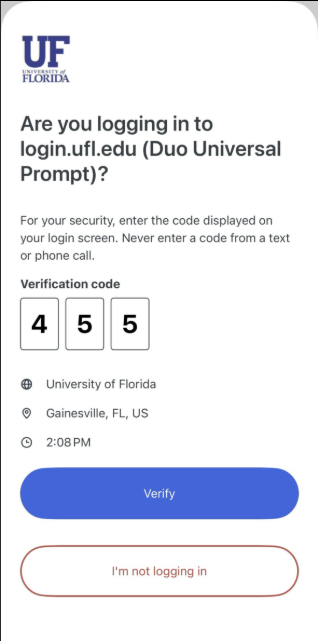 |
Please contact the UFIT Help Desk if you have any questions or concerns about the changes to the multi-factor prompt.
Duo Passcodes to Begin Expiring
The Duo app, security keys or TouchID should be the primary options for use with Duo’s multi-factor authentication. If you are in an environment where these options cannot be used, you can generate five passcodes that can be used for multi-factor authentication.
Starting on Tuesday, March 3, Duo’s one-time passcodes will expire eight days after they have been generated.
Why We’re Making This Change
Currently, passcodes generated by Duo through UF's multi-factor authentication portal do not expire until a new set of codes is generated. This increases the risk of compromised accounts, as attackers may exploit old, unused passcodes. Implementing an expiration timeline for passcodes will enhance the security of UF's multi-factor authentication, ensuring real-time access.
What You Need to Do
UFIT recommends all UF faculty, students and staff enroll in at least two multi-factor authentication methods (e.g.: Duo Verified Push through the Duo mobile app, hardware security keys, TouchID).
If you are not currently enrolled in at least two multi-factor authentication methods, please visit the My Multi-Factor webpage to review the authentication options available and enroll.
If you rely on Duo’s one-time passcodes, please be aware of the new expiration times.
Update Your Duo Mobile App
Duo Security announced a vendor-initiated change impacting how the Duo Mobile app communicates with Duo’s service. As a result of this change, outdated versions of the Duo Mobile app will stop functioning by Tuesday, March 31, and users may be unable to complete multi-factor authentication if their Duo Mobile app is not updated.
Versions 4.85.0 or older of the Duo Mobile app may experience authentication failures once the vendor change takes effect.
What You Need to Do
Ensure your Duo Mobile app is updated before Tuesday, March 31, to the latest version from the Apple App Store or Google Play Store.