



UFIT Digital Signage Services
Malachowsky Hall Open Collab
UFIT Digital Signage Services
Malachowsky Hall Digital Wayfinding
UFIT Digital Signage Services
Wertheim Lobby Video Wall Digital Signage
Frequently asked questions
What's this Service for?
- Digital signage display’s provide new opportunities for departments to engage with students, faculty, staff, and visitors through a variety of methods. This includes informational slides, multimedia content, campus maps, emergency messaging, and more. UFIT’s Digital Signage service provides a turnkey solution for departments looking to add value to their existing services by leveraging digital signage, without requiring substantial IT overhead of costs.
- UFIT utilizes a separate cloud instance of Novisign allowing Gatorlink to be used for accounts with multifactor authentication.
How Do I Purchase Licenses?
- Licenses can be purchased from our UF Software Licensing Services here SLS Software
How Much Does it Cost?
- Novisign is currently $70.69 per display annually
How Do I Get Started?
- Contact us using the Request More Information Button Above
What file formats does NoviSign support?
- From your desktop upload images, slides, videos and other media to the library. All media will be saved in the cloud and accessible anytime.
- PowerPoint: PPT, PPTX, PPS, PPSX
- Google: slideshow, spreadsheet
- Word: DOC, DOCX, ODT, DJVU, RTF, and PS
- Spreadsheet: XLS, XLSX and ODS
- Images: JPG, JPEG, PNG and GIF
- Audio: M4A
- Videos: MP4
Can NoviSign run on a video wall?
- Depending on the type of video wall you may need additional hardware or need to have two NoviSign instances running in sync.
What kind of support is included with NoviSign?
Novisign offers the following support,
- Easy To Contact Novisign: phone, email, or social media
- Help Center: simple online guides and materials
- Video Tutorials: step-by-step videos
- Quick Start: online easy-to-use the resource center
- Email Help Desk: 24/7 email ticking
- Webinars: Free online demos and training
Can NoviSign run on Android and WebOS TV's?
- Yes, you can download the NoviSign app onto most Android OS TV’s and specific LG WebOS TV's. UFIT recommends specific LG and Sony Displays. Contact us to get more information on recommended TV’s
What apps and widgets are included with NoviSign?
- Novisign has over 20+ drag and drop widgets. No technical setup IT background is needed to use the widgets.
- RSS feeds; CNN, ESPN, Reuters, BBC and more!
- Media slideshows; videos, images, text, weather, and scrolling feeds
- Social media widgets; Twitter, Facebook and Instagram
- Live streams; YouTube and Ustream
- Google; slides, documents and spreadsheets
- Touchscreen; interactive kiosks
- Websites; integrate URLs and web images
- Custom Tickers; scrolling text feeds
- Weather; forecasts and conditions
Can I do wayfinding or create a kiosk?
- They are included in the license. You will need a touchscreen display to be able to utilize these options.
How do I invite a user to create content for my department or group?
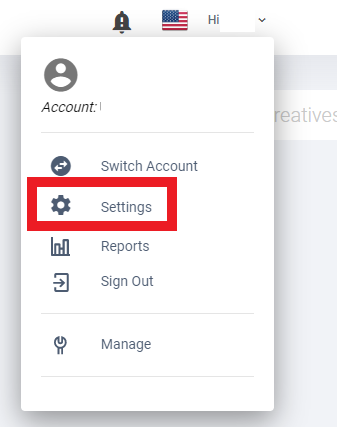
Access the Account Team Tab by clicking your username then clicking settings
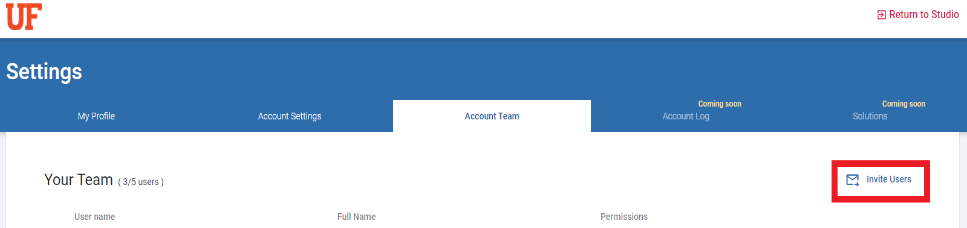
Invite Users Under The Account Team Tab by clicking the “Invite Users” Icon.
*A maximum of 5 users can be added.
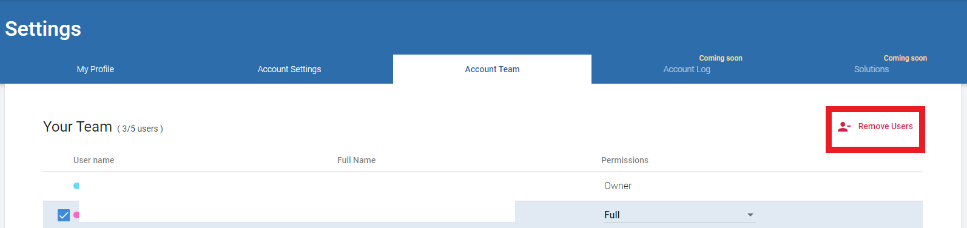
Remove Users Under The Account Team Tab by selecting the checkbox next to a username. You will then see the “Remove Users” icon